BETA VERSION 1.0 NOW AVAILABLE

From foreign-currency invoices
to bank payment files, in one USD ledger.

JVLedger is an IFRS accounting web application for companies that participate in joint ventures such as LNG projects. Enter invoices in their own currency, and create payment files for your bank when the payment is approved. Month-end FX revaluation takes one click.
IFRSUSD ledgerForeign-currency transactionsIAS 21 month-end revaluationZengin · ISO 20022LNG JV (IFRS 11)4-role workflow
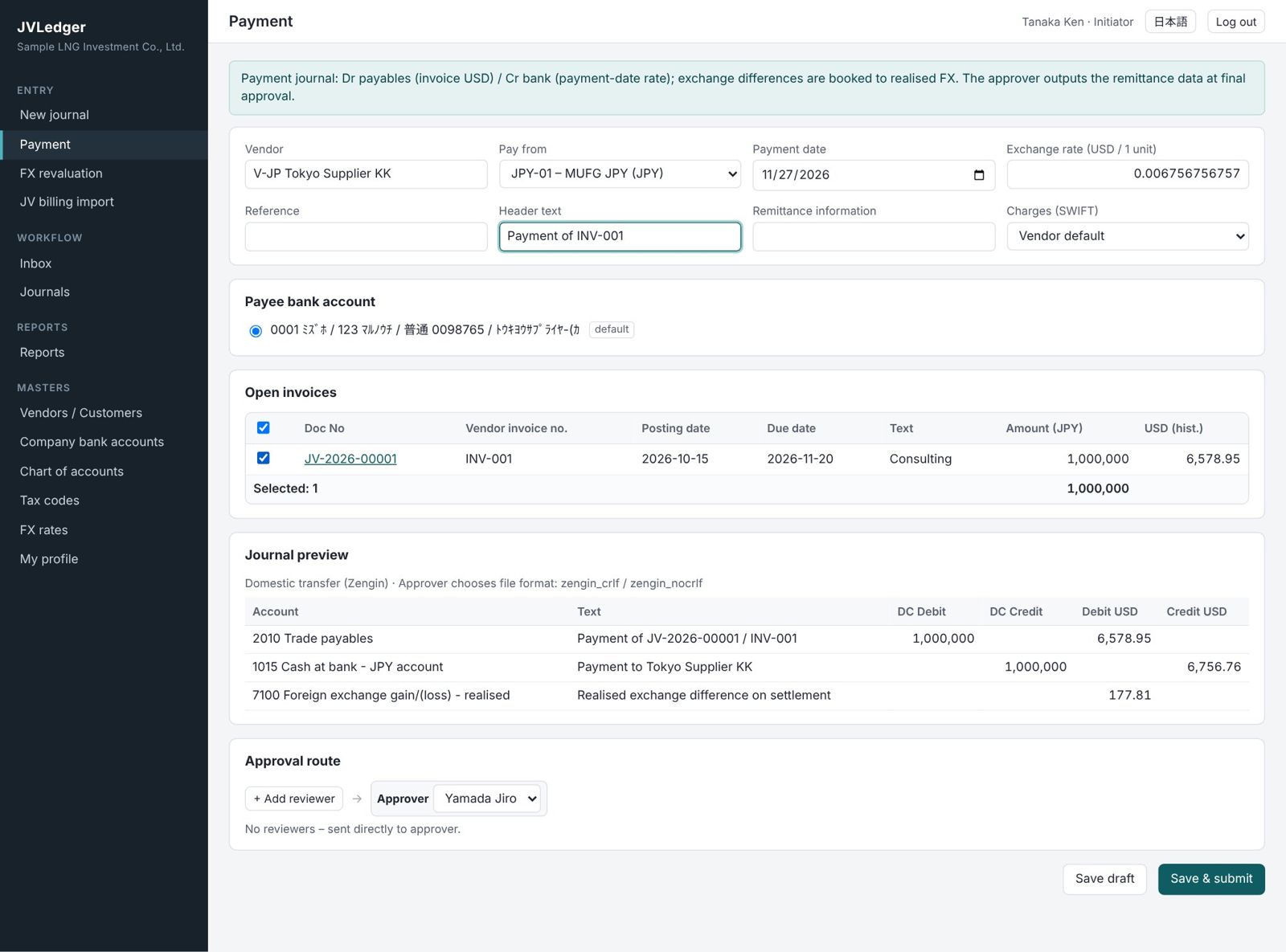
Payment entry screen
About

What JVLedger does

One ledger, in USD. Foreign-currency transactions are recorded in both the document currency and USD. JVLedger keeps the ledger structure, reports and approval workflow of the multi-currency system "FX Ledger", and adds payables payment, bank payment files and month-end FX revaluation.

¥

Enter in the invoice currency

Enter the invoice currency and amount as they are. The rate comes from the FX rate master and USD is calculated.

⇪

Payment file at approval

At final approval of a payment, select a format to create a Zengin, pain.001 or CSV file.

⟳

One-click month-end revaluation

FX bank balances and payables are revalued at the closing rate and reversed automatically on the 1st.

✓

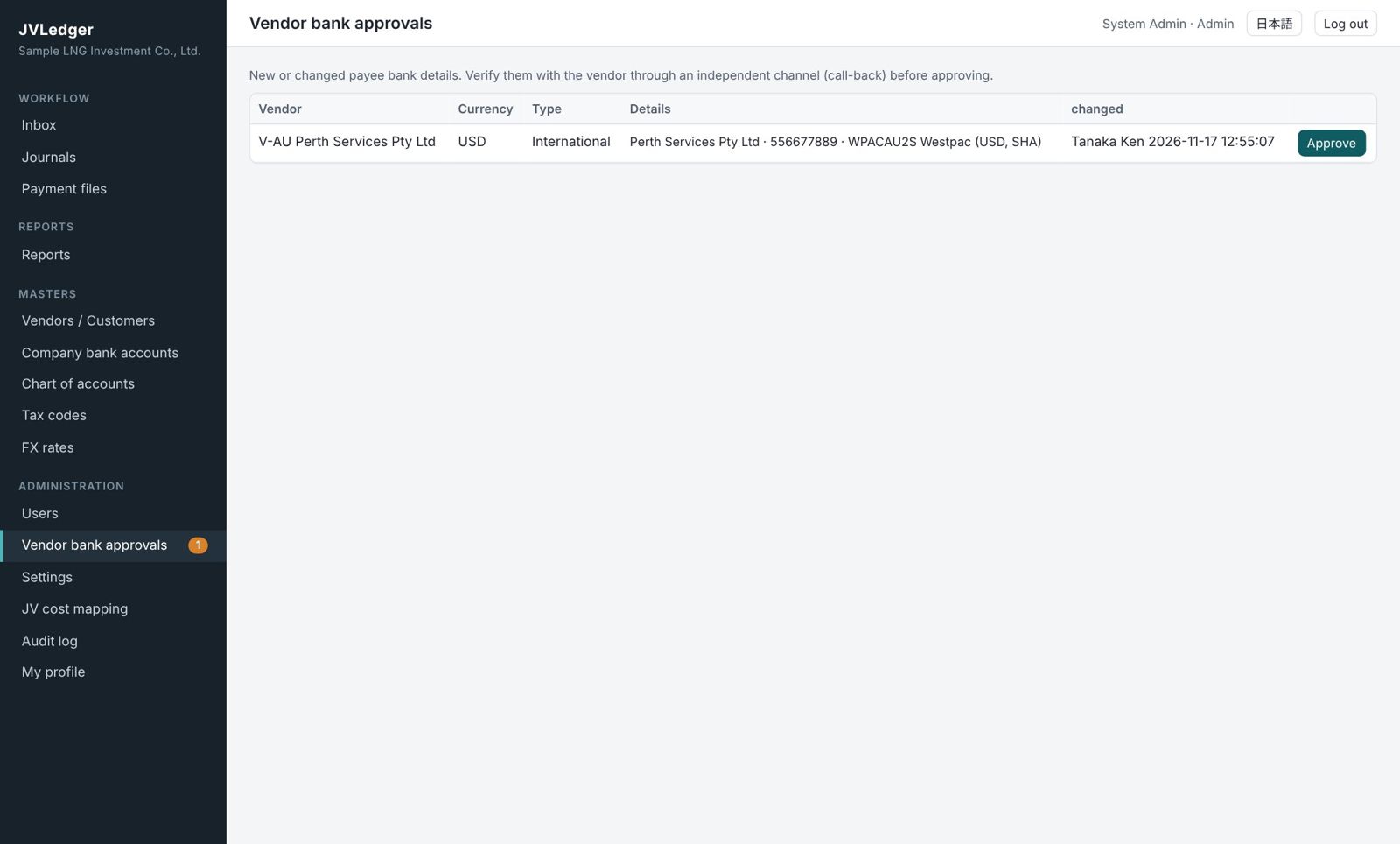
Controls against payment fraud

Payee bank changes approved by another admin, double-payment blocking, file hash and download count.

Features

Main features

Covers the monthly work of a small finance team, from foreign-currency invoices to payments, revaluation and financial statements.

Foreign-currency journal entry

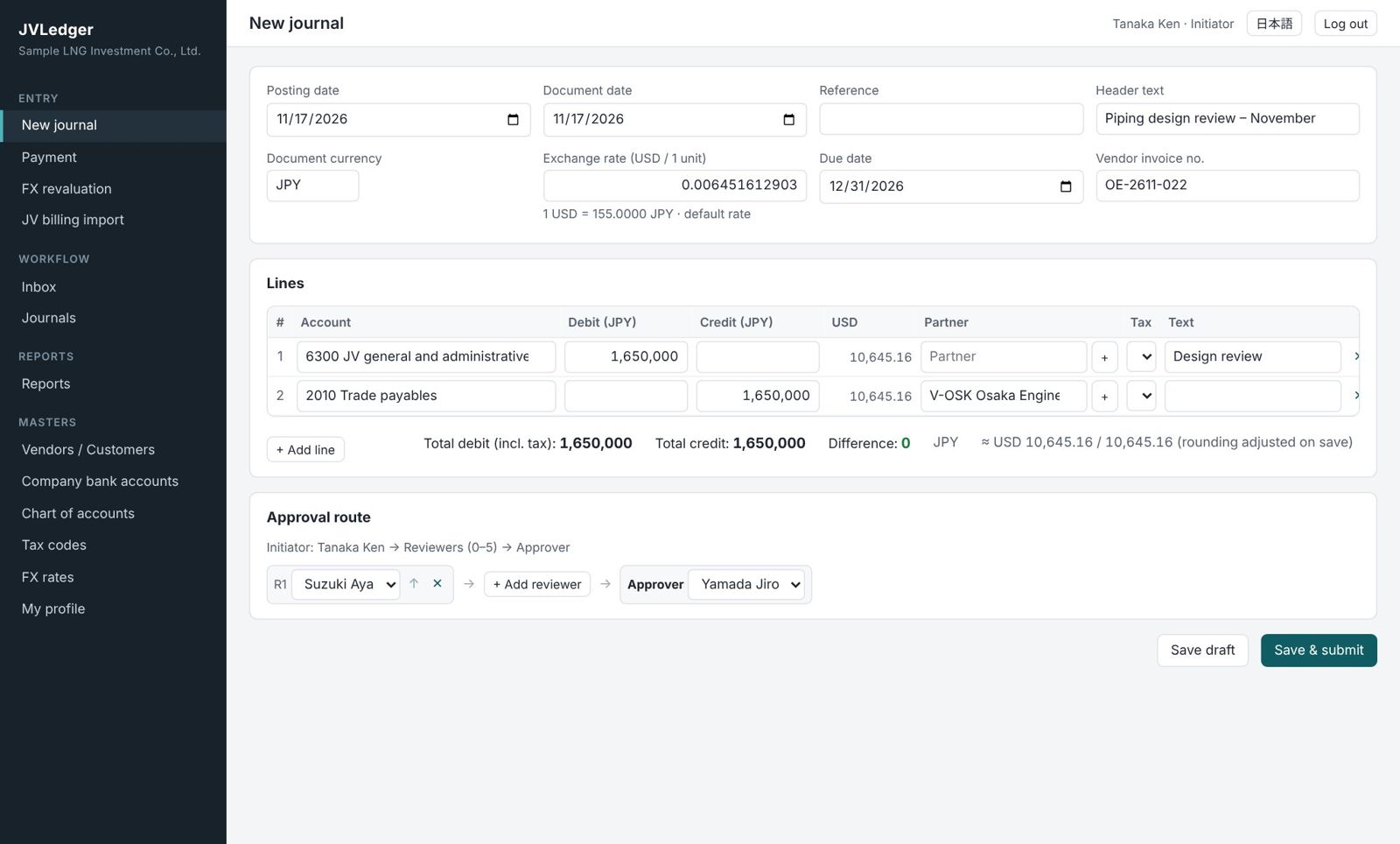
Journals have a document currency and an exchange rate; lines are entered in the document currency. USD is calculated and rounding is adjusted automatically.

  • Posting date and document date
  • Due date and vendor invoice number for open-item payables
  • USD and JPY bank accounts only in journals of their own currency, so FX balances always agree
Journal entry

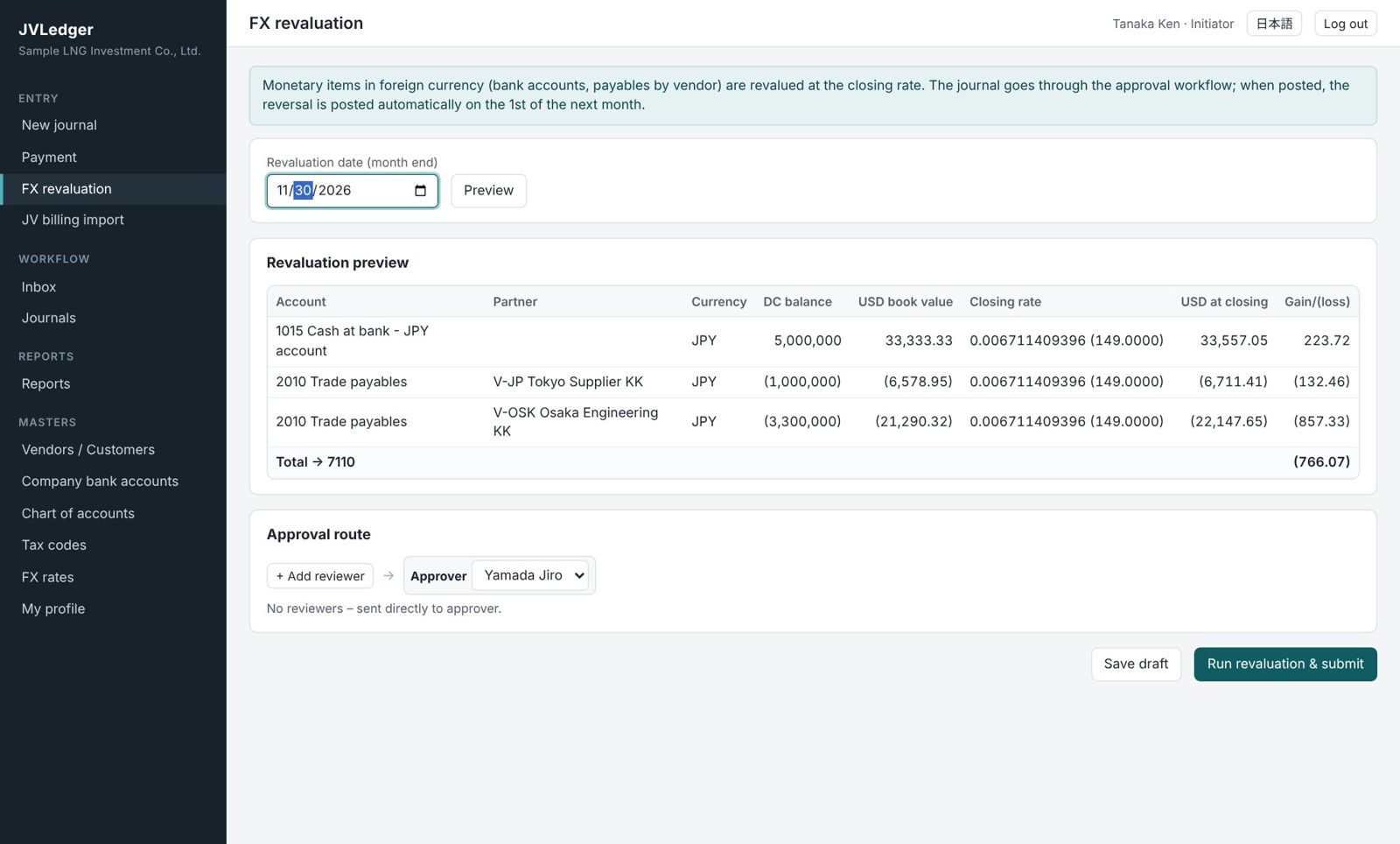
Month-end FX revaluation (revalue and reverse)

FX bank balances are revalued per account, and payables per vendor and currency, at the closing rate.

  • Preview the differences before running
  • The revaluation journal is approved through the workflow
  • A reversal dated the 1st of the next month is posted automatically
FX revaluation

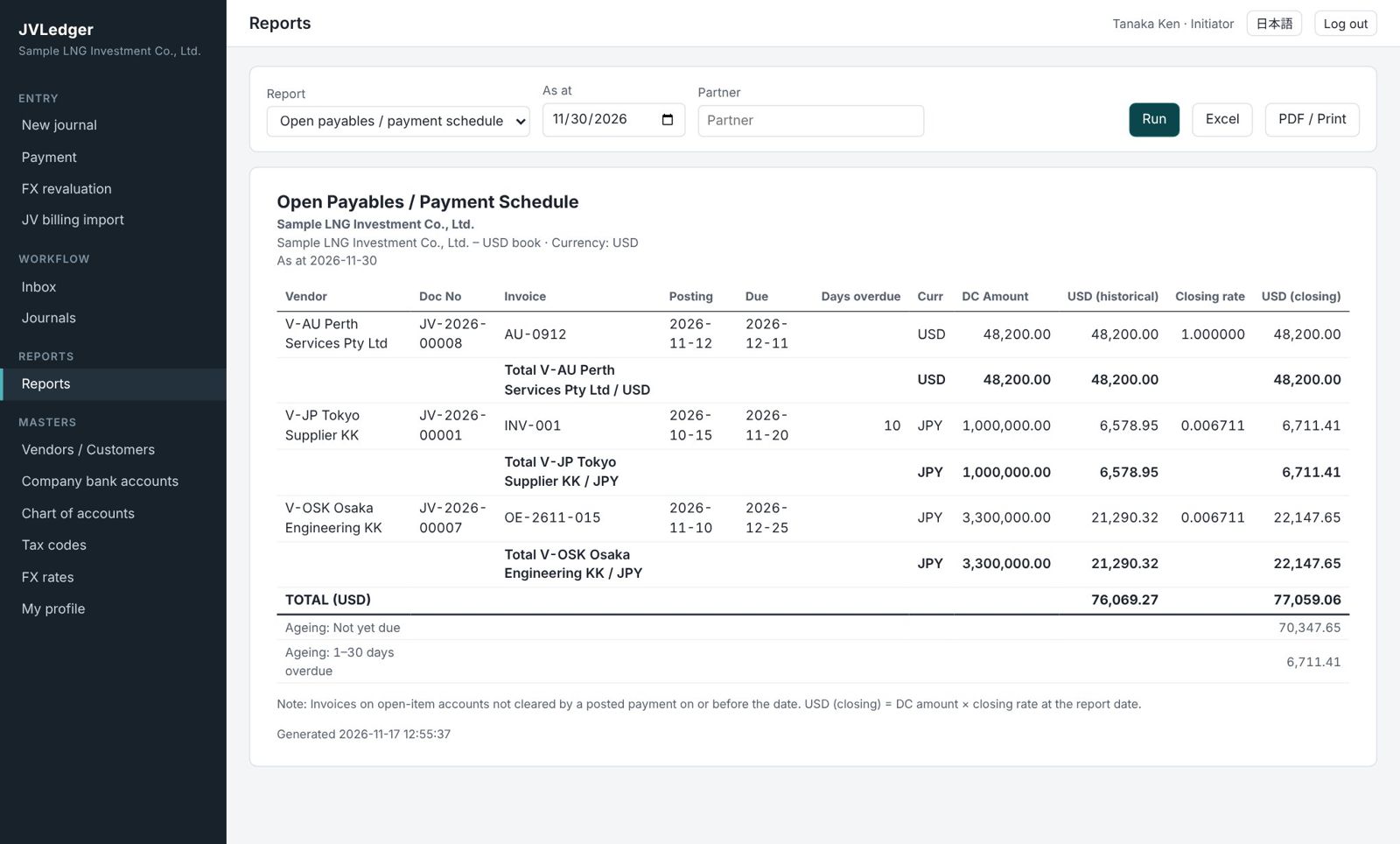
Open payables and payment schedule

Unpaid invoices at a date, grouped by vendor and currency.

  • Due date, days overdue and ageing
  • USD at historical and at closing rate
  • Excel and PDF output
Open payables report

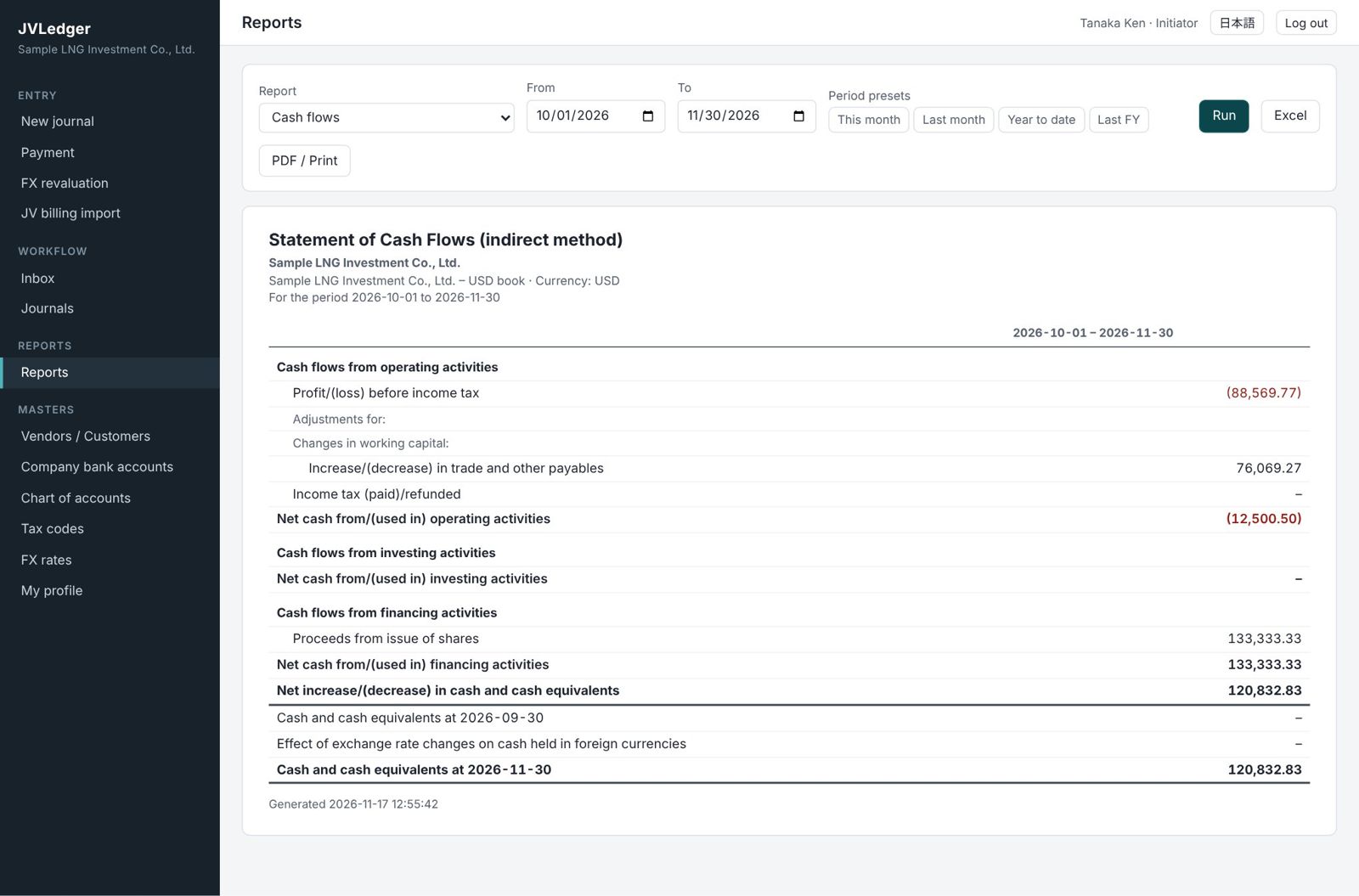
IFRS financial statements

Statement of financial position, profit or loss and OCI, changes in equity and cash flows (indirect method).

  • FX revaluation of cash shown as "Effect of exchange rate changes on cash"
  • Journal and general ledger with FX amounts and FX balances
  • JV billing statement import (IFRS 11)
Statement of cash flows
Payments

Payments and bank payment files

JPY invoices are paid from the JPY account and USD invoices from the USD account. The initiator selects invoices to create a payment; the approver outputs the payment file at final approval. Payments are not combined: one file per payment.

1 Post invoice→2 Create payment→3 Final approval + file→4 Upload to web banking

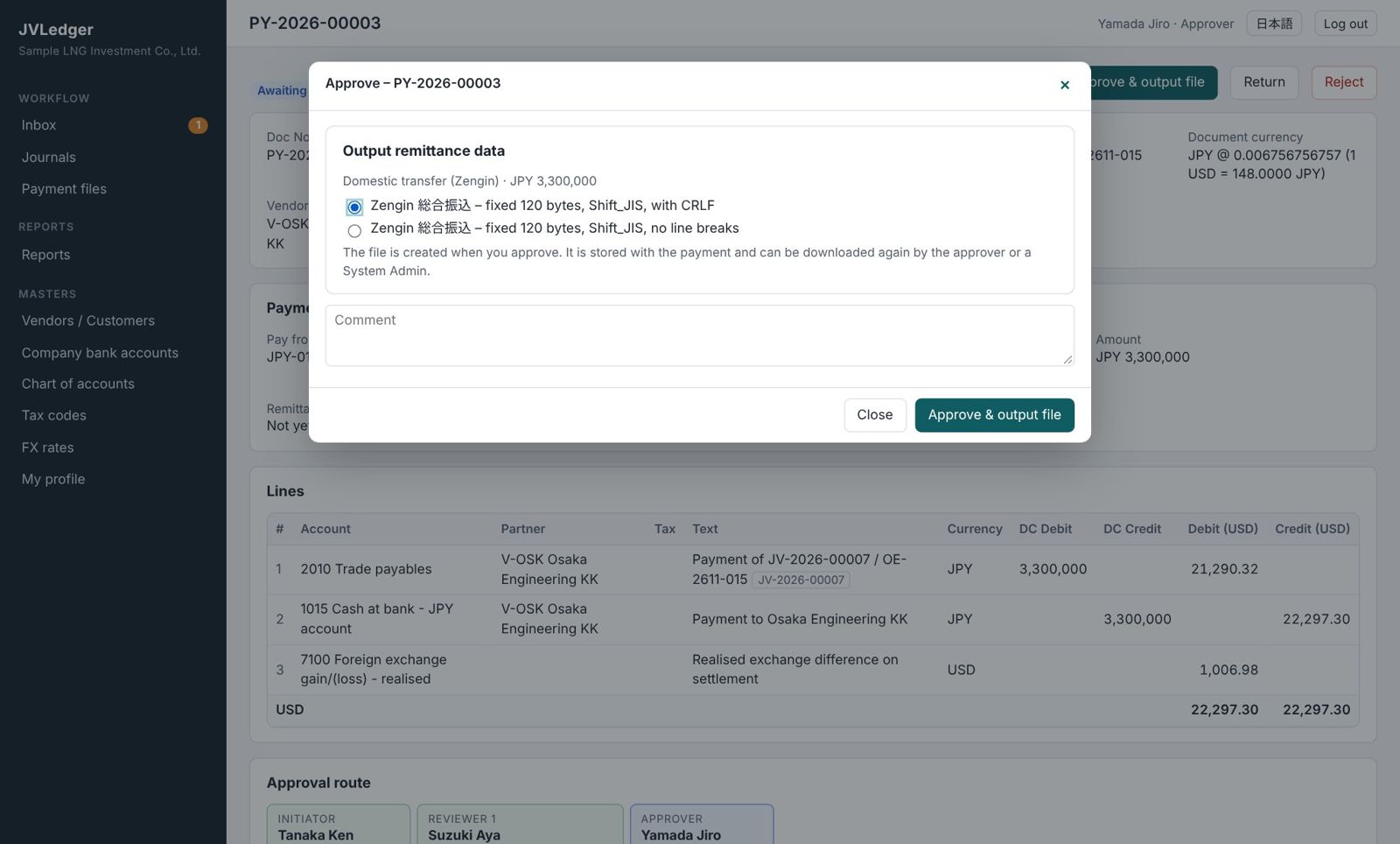
Select the format on the approval screen

Domestic (Japan)Zengin bulk transfer (fixed 120 bytes, Shift_JIS, with / without line breaks)
International / FXISO 20022 pain.001.001.09 / pain.001.001.03 (XML), generic CSV
  • Payment journal (Dr payables / Cr bank) with realised FX booked automatically
  • Files stored with the payment, with SHA-256 and download count
  • Only the approver and System Admins can download again
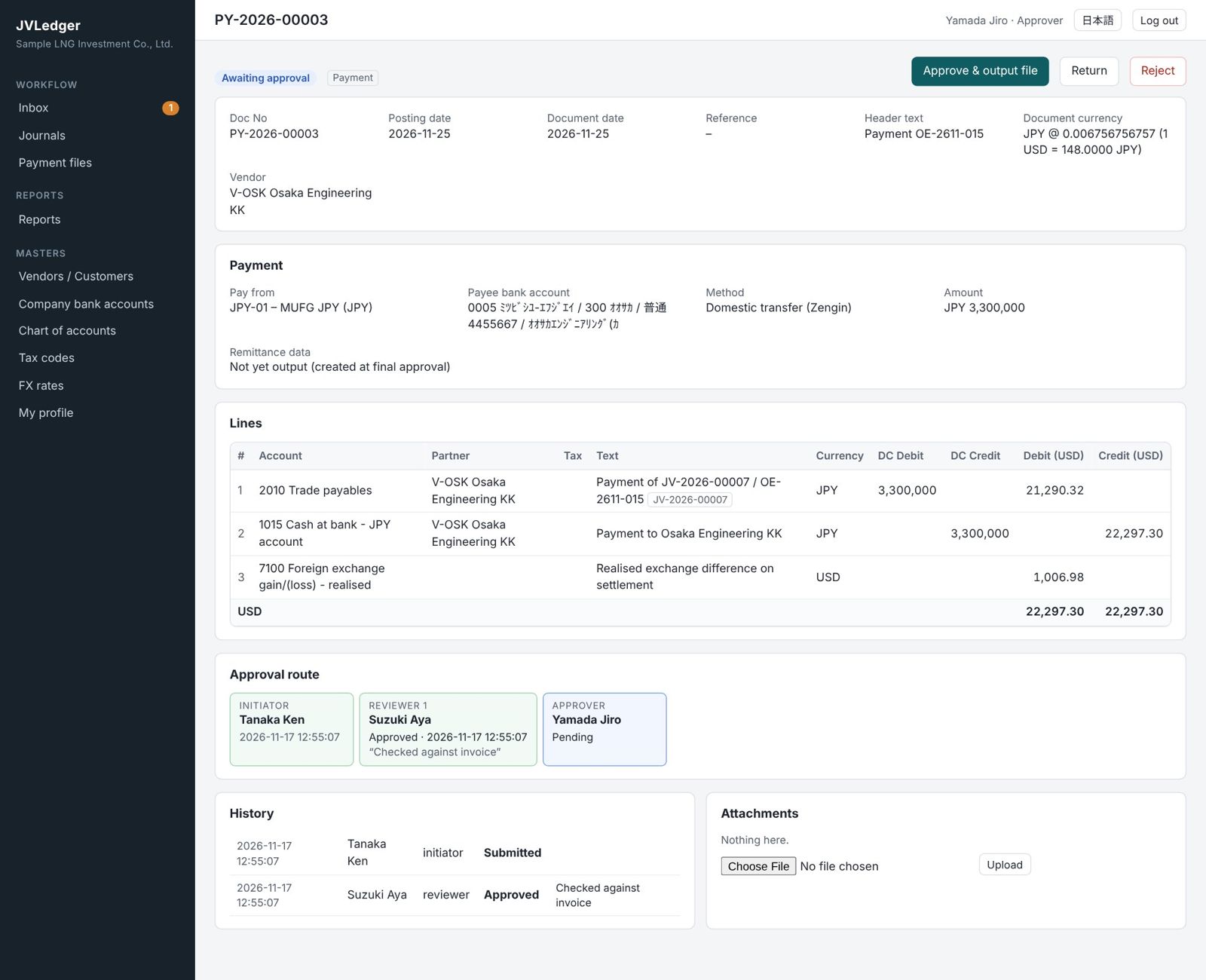
Final approval and file format

Payee bank accounts in the vendor master

Each vendor can have several domestic (Zengin) and international (SWIFT) accounts; the default account is selected in payments.

  • New or changed accounts cannot be used until a System Admin other than the changer approves
  • A payment cannot be finally approved if the account changed after submission
  • Invoices already in another payment cannot be selected
Payee bank approvals
Workflow

Four roles and the approval workflow

Every journal, payment and revaluation is routed initiator → reviewers (0–5, in order) → approver, and posted at final approval (up to 20 users).

ROLE 1

System Admin

Users, company bank accounts, FX rates, payee bank approvals, period lock, audit log

ROLE 2

Initiator

Journals, payments and revaluation; partners and payee accounts

ROLE 3

Reviewer

Reviews journals and evidence; approves, returns or rejects

ROLE 4

Approver

Final approval and posting; outputs payment files

Segregation of duties enforced

  • Initiators cannot review or approve their own journals
  • The approver cannot also review the same journal
  • Return and reject need a comment and are kept in the history
  • No submission or approval in locked periods
Payment awaiting approval
Try it

Trial accounts

Log in to the beta system with the accounts below. Enter an invoice or payment as the initiator, then log in as the reviewer and the approver to follow the whole flow up to approval and payment file output.

RoleUsername (ID)PasswordWhat you can try
1. System AdminadminadminashikariUsers, company bank accounts, FX rates, payee bank approvals, accounts, settings, audit log and all reports
2. Initiatorinit01Testinitiator1Foreign-currency journals, payments, month-end FX revaluation, JV billing import, partners and payee bank accounts
3. Reviewerrev01Testreviewer1Review, approve, return or reject routed journals
4. Approverappr01Testapprover1Final approval (posting) and payment file output at approval of payments
Log in to the system

Please note

  • The trial accounts are shared. Data you enter is visible to others and may be changed or deleted without notice.
  • Do not enter real company, personal or bank account information. Never upload payment files created in the trial to a real bank.
  • Please do not change passwords or deactivate users, which would prevent others from trying the system.
  • Payee bank accounts must be approved by a System Admin other than the person who entered them, so register them as init01 and approve them as admin.
Video

Introduction video: features and operation (about 17 min)

From the concept of the system to entering foreign currency invoices, payments and payment files, payee bank control, month-end FX revaluation, books and statements, administrator settings and the monthly routine – with English narration and subtitles.

Downloads

Documents

Use the Functional Overview for evaluation and the User Guide for daily operation.

PDF

Functional Overview

Accounting assumptions, differences from FX Ledger, foreign-currency transactions, payables and payments, payment file formats, payee bank controls, month-end revaluation, reports, security and requirements.

A4 · 21 pages · 2.9 MB
Download
PDF

User Guide by Role

Step-by-step operations for Initiators, Reviewers, Approvers and System Admins, payments and payment files, month-end revaluation, the monthly cycle and error messages.

A4 · 18 pages · 2.6 MB
Download
MP4

Introduction video (about 17 min)

Features and operation explained with English narration and on-screen subtitles (1920×1080). The subtitle file (SRT) is also available.

MP4 · 16 min 46 s · 20.0 MB
Download MP4Subtitles (SRT)
Beta

About the beta

This beta is an early release for checking features and usability.

ServerPHP 8.1+, MySQL 5.7+ / MariaDB 10.3+ (runs on standard cPanel hosting)
BrowserLatest Google Chrome, Microsoft Edge, Safari or Firefox
LanguageJapanese / English UI per user; reports in English
BanksMizuho Bank and MUFG Bank (USD and JPY accounts)
SecurityHTTPS, hashed passwords, login lockout, CSRF protection, audit log

Beta limitations

  • Payment files follow common specifications. Confirm each bank's import specifications and test with small payments before production use.
  • No bank API connection, automatic import of payment results, bank statement reconciliation or combining of payments.
  • Open-item management covers payables only. Bank charges are not in the payment file.